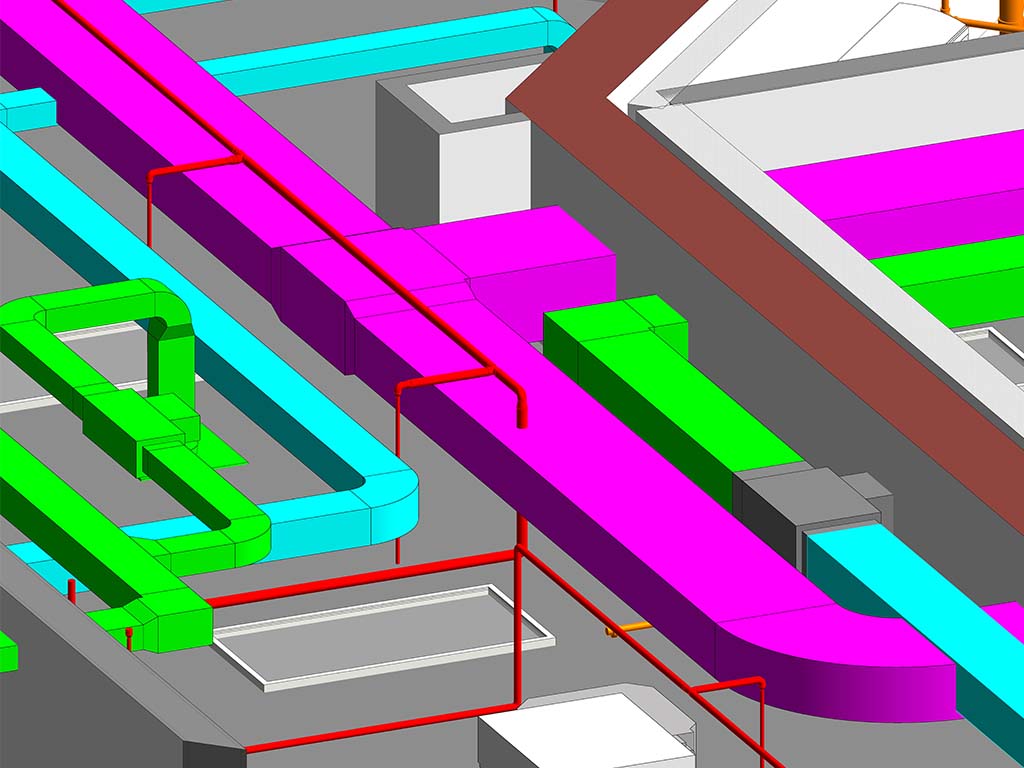
The Hidden Cost of a Single Undetected Clash
Picture this: a concrete structural beam running at 3,200 mm above finished floor level, and an HVAC supply duct from the mechanical engineers routed at exactly the same height through the same space. On paper — or rather, on two separate 2D drawing sets — neither engineer notices. The drawings are issued for construction. The contractor builds the concrete frame. The mechanical subcontractor then arrives to hang the ductwork.
The clash is discovered on site. The concrete beam cannot move. The duct route must be redesigned, re-fabricated, re-installed — eating into programme time, requiring new site instructions, and generating professional fees for the redesign. A clash that would have cost approximately $500 to resolve in a BIM model has now cost between $15,000 and $80,000 in remedial works, delays, and professional time.
This scenario plays out on construction sites around the world every day — on projects that did not use coordinated BIM with proper clash detection. It doesn't have to.
Three Types of Clashes Navisworks Detects
Navisworks Manage categorises clashes into three distinct types, each requiring a different resolution approach. Understanding these helps clients appreciate the full scope of what clash detection delivers:
Hard Clashes — Physical Intersections
A hard clash occurs when two physical elements occupy the same space. The HVAC duct running through the structural beam is a hard clash. A drainage pipe penetrating a shear wall without a pre-formed opening is a hard clash. These are the most critical — they are physically impossible to build as modeled and must be resolved before construction.
Navisworks detects hard clashes by testing the geometry of every element in every discipline model against every other element. On a typical 10-storey commercial building, a first-round clash test may yield 2,000–8,000 hard clashes — the majority of which cluster around plant rooms, ceiling voids, and structural transfer zones.
Soft Clashes — Clearance Violations
A soft clash does not involve direct intersection but rather a violation of the required clearance zone around an element. A maintenance engineer needs 600 mm clear access to an air handling unit. If a cable tray is routed 400 mm away, the AHU cannot be serviced in operation — that is a soft clash.
Soft clash tolerances are defined in the clash detection setup and vary by element type. Navisworks can be configured with specific buffer distances per discipline, allowing the engineer to flag clearance violations before they become operational problems after building handover.
Workflow (4D) Clashes — Sequencing Conflicts
When 4D BIM is employed, Navisworks can also detect workflow clashes — situations where the construction sequence makes it physically impossible to install one element before another. For example, a precast concrete staircase cannot be craned into position after the structural frame above it has been cast. Workflow clash detection prevents programme logic errors that would otherwise only emerge during construction planning.
🔍 From my practice: On a recent 2-storey residential project, the first-round Navisworks test detected 147 clashes — 89 hard clashes between structural beams and MEP ductwork, and 58 soft clashes around maintenance access zones. All 147 were resolved at design stage. Estimated on-site remediation cost avoided: over $120,000.
The Clash Detection Process Step by Step
A professional clash detection engagement follows a structured process to ensure every clash is identified, communicated, and resolved efficiently:
- Model Collection: All discipline models are collected in a Common Data Environment (CDE) — Autodesk BIM 360, ACC, or a shared folder. Models may be in Revit (.rvt), IFC, AutoCAD (.dwg), or other formats. Navisworks can aggregate all of these.
- Federation: Models are linked in Navisworks to create a single federated model. Each discipline appears as a separate selection set, enabling precise clash grouping by discipline combination.
- Clash Test Configuration: Clash tests are configured for each discipline pair — Architectural vs Structural, Structural vs MEP, MEP internal clashes, etc. Tolerances are set: typically 0 mm for hard clashes, 300–600 mm for soft clashes depending on element type.
- Clash Test Execution: Navisworks runs the automated tests. Results are grouped, de-duplicated, and filtered to remove false positives (e.g. elements sharing a common face are not true clashes).
- Clash Report Issue: A detailed report is prepared showing every clash with: a 3D viewpoint, discipline owners, element IDs, clash type, location coordinates, and recommended resolution. Reports are delivered in Excel, PDF, or embedded in Navisworks NWD.
- Resolution Round: Each discipline team resolves their assigned clashes and resubmits their model. This process repeats — typically 2–4 rounds — until the model is clash-free to the agreed tolerance.
- Coordinated Model Sign-Off: A final zero-clash (or accepted residual clash) model is signed off by all parties as the basis for construction.
What Navisworks Produces: Deliverables Explained
At the conclusion of the clash detection process, the following deliverables are typically issued to the project team:
| Deliverable | Format | Purpose |
|---|---|---|
| Coordinated Federated Model | .nwf / .nwd | Complete multi-discipline model — issued for construction reference |
| Clash Detection Report | Excel / PDF | Full log of all clashes: location, discipline, severity, resolution status |
| 3D Clash Viewpoints | Navisworks Viewpoints | Saved viewpoints showing each clash for designer review |
| Resolution Log | Excel | Tracks each clash from detected → assigned → resolved → verified |
Who Needs Clash Detection?
Any project involving more than one building discipline benefits from clash detection. In practice, it is most critical on:
- Multi-storey residential buildings (2+ storeys with services routing through structural zones)
- Commercial and office fit-outs (dense MEP coordination in ceiling voids)
- Industrial and warehouse projects (large-span structural steel with extensive mechanical services)
- Healthcare facilities (highly complex MEP with strict spatial requirements)
- Infrastructure projects (tunnels, bridges, utilities — where physical access for remedial work is extremely costly)
Even single-storey residential projects with a basement plant room or complex ceiling services benefit significantly from a single-round clash test — which can be completed in 1–2 days and cost a fraction of even a single on-site RFI.
Clash Detection Across International Projects
One of the most powerful aspects of BIM-based clash detection is its complete independence from geography. The structural engineer in Sydney, the MEP designer in London, the architect in Dubai, and the BIM coordinator in Sri Lanka all work from the same federated model in the cloud. Clashes are detected, reported, resolved, and re-tested without a single site visit or in-person meeting.
This distributed model — powered by Autodesk BIM 360 and Navisworks — is now the standard for major international projects. Remote BIM specialists can deliver the same quality of coordination as on-site teams, typically at significantly lower cost, with faster turnaround times due to time-zone advantages.
🌍 Remote coordination: Working across time zones means clash reports can be issued at end-of-day in one country and reviewed first-thing in another — effectively running a 24-hour coordination cycle that compresses the design programme. I regularly coordinate models for projects in the UK, Australia, and the Middle East from Sri Lanka with zero loss of quality or communication speed.
Stop Paying for Clashes
That Should Never Reach Site
Professional Navisworks clash detection and resolution coordination — delivered remotely for residential, commercial, and industrial projects worldwide.